
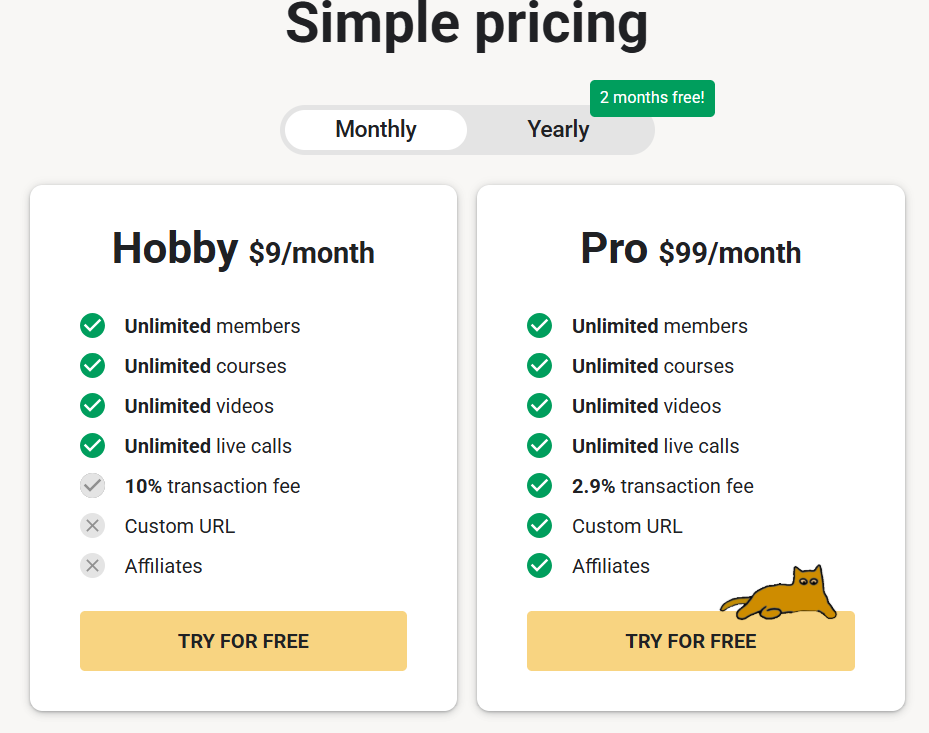
Circle and Skool sit at opposite ends of the same market. Skool strips everything down to one feed, one classroom, and a gamification system built around points and levels — starting at $9/month. Circle goes the other direction, offering a much broader feature set — website builder, AI tools, and extensive API access on higher tiers — starting at $89/month (billed annually). The right choice depends heavily on whether you want simplicity or depth.
This comparison breaks down pricing, real payment costs, and features to help you decide which fits your community.
Quick Summary
| Feature | Circle | Skool |
|---|---|---|
| Best For | Creators who want a full-featured platform with courses, website builder, and AI tools | Coaches who want the simplest possible setup with strong gamification |
| Starting Price | $89/month, billed annually (Professional) | $9/month (Hobby); $99/month (Pro) |
| Free Trial | 14-day free trial, no credit card required | 14-day free trial, cancel anytime |
| Transaction Fees | 2% (Professional), 1% (Business), 0.5% (Circle Plus), plus Stripe processing | 10% + $0.30 (Hobby); 2.9% + $0.30 up to $899, then 3.9% + $0.30 above $900 (Pro). Payment processing is included |
| Course Tools | Full native course hosting, unlimited on every plan | Basic classroom with drip scheduling — no quizzes or certificates |
| Community Structure | Multiple organized spaces (20–30 depending on plan) | One unified feed, no separate spaces to configure |
| Gamification | Included as one feature among many | Central to the product — points, levels 1–9, leaderboards |
| Branding Control | Custom branding on every plan; Circle branding removal on Business and up | Minimal — your community looks and feels like Skool |
| Mobile Apps | Standard iOS/Android Circle app on current plans; optional branded apps through Circle Plus (custom pricing) | Native iOS/Android apps covering the core member experience |
| Money-Back Guarantee | 30-day, no-questions-asked | 14-day trial; subscription fees are non-refundable |
Pricing and fees checked against Circle’s and Skool’s official pricing and help pages in September 2026.
Quick Recommendation:
Choose Circle if you want a genuinely all-in-one platform — courses, website, AI tools, and (with an add-on) email marketing — and can justify the higher cost. Circle’s edge is features, not fees.
Choose Skool if you want the cheapest, simplest way to launch a gamified community and don’t need deep course tools or branding control.
Fees: Compare the Total, Not Just the Platform Cut
At first glance, Skool’s $9/month Hobby plan looks like the obvious budget choice, and its 10% + $0.30 transaction fee is far higher than Circle’s 2% platform fee. But the two numbers measure different things. Circle’s 2% is only Circle’s own fee. Stripe’s payment processing is added separately (typically 2.9% + $0.30 on U.S. cards), and for recurring memberships Circle’s payment documentation shows Stripe Billing adding another 0.7%. Skool’s quoted transaction fees, by contrast, already include payment processing.
Here is what a $50 recurring membership payment costs on a U.S. card:
| Plan | Fee breakdown | Approx. total on $50 |
|---|---|---|
| Skool Hobby | 10% + $0.30 | $5.30 |
| Circle Professional | 2% + 2.9% + 0.7% + $0.30 | $3.10 |
| Circle Business | 1% + 2.9% + 0.7% + $0.30 | $2.60 |
| Circle Plus | 0.5% + 2.9% + 0.7% + $0.30 | $2.35 |
| Skool Pro | 2.9% + $0.30 | $1.75 |
One-time purchases skip the Stripe Billing charge, which lowers Circle’s totals by about $0.35 on a $50 payment — Skool Pro is still cheaper. Actual Circle costs vary by country, payment method, and Stripe’s current rates, and international cards or currency conversion can add more.
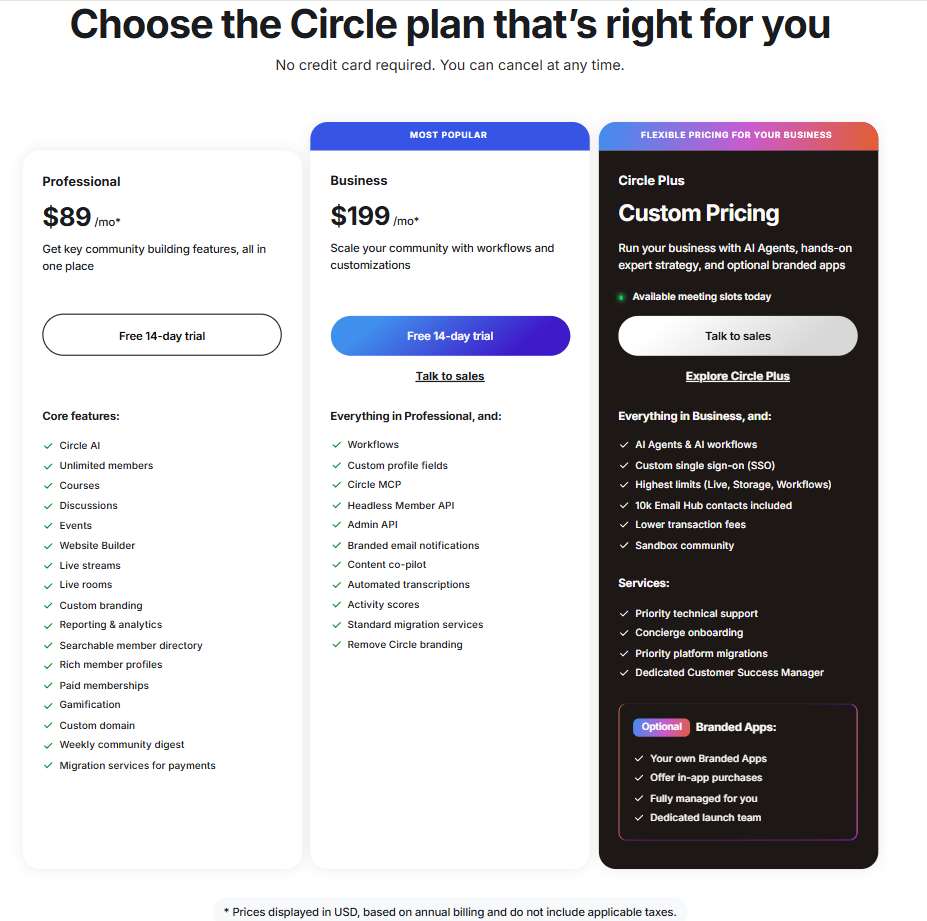
Plan prices need a like-for-like basis too. Circle’s $89/month for Professional is billed annually, and Circle doesn’t publish a month-to-month rate on its pricing page. Skool’s $9 and $99 headline prices are monthly; on yearly billing (two months free) they work out to about $7.50 and $82.50 a month. On the same annual basis, Skool Pro costs slightly less per month than Circle Professional, and it charges lower payment fees on each sale.
The takeaway: on payment costs, Skool is generally the cheaper platform — Skool Pro especially — while Circle’s higher subscription price pays for a much broader feature set.
Feature Comparison
1. Community Structure
Circle organizes communities into multiple spaces (20 on Professional, 30 on Business), letting you separate discussions, courses, and events into distinct sections. Skool uses a single unified feed for everything, with categories for filtering — simpler to navigate, but with less structural flexibility as your community grows.
2. Courses
Circle includes full course hosting natively on every plan. Skool’s classroom covers video lessons, links, documents, and drip-scheduled content, but doesn’t include quizzes or completion certificates — a real gap if structured learning matters to your community.
3. Gamification
Both platforms include gamification, but it plays a very different role in each. Skool built its identity around points, levels (1 through 9), and leaderboards — it’s central to how the product works. Circle includes gamification too, but as one feature among many rather than the defining one.
4. Fees & Monetization
Circle’s platform fees (2%/1%/0.5%) are lower than Skool’s Hobby fee (10% + $0.30), but they sit on top of Stripe processing, while Skool’s fees include it. Counted together, total cost per sale is usually lower on Skool, and lowest on Skool Pro. Skool also runs an optional Growth Boost feature — on by default — where Skool takes a 30% commission on customers its own marketing brings you, for as long as their subscription stays active; you can toggle it off. Circle has no equivalent.
Refunds work differently too: Skool’s transaction fees are non-refundable, even when you refund a member. Circle returns its own transaction fee when you refund through Circle (though not if you refund directly in Stripe).
5. Branding & Integrations
Circle offers custom branding on every plan, with Circle’s own branding removable on Business and up. Business also adds unlimited automations plus the Admin API and Headless Member API (usage is metered against included monthly limits). Skool offers limited branding control, and its Zapier integration is Pro-only, so Hobby users have fewer options for connecting Skool to external business tools.
Pricing Comparison
Circle Pricing
Circle’s listed prices are in USD, based on annual billing, and exclude taxes.
- Professional ($89/month): Unlimited members, 3 admins, 10 moderators, 20 spaces, 200 GB storage, course hosting, website builder, gamification, custom branding, and a 2% transaction fee (plus Stripe processing).
- Business ($199/month): Everything in Professional, plus 5 admins, 30 spaces, 500 GB storage, unlimited automations, the Admin and Headless Member APIs, content co-pilot and automated transcriptions, removal of Circle branding, and a 1% transaction fee (plus Stripe processing).
- Circle Plus (custom pricing): Everything in Business, plus AI Agents, custom SSO, the highest usage limits, and optional fully managed branded mobile apps, at a 0.5% transaction fee (plus Stripe processing).
- Email marketing is a separate add-on (Email Hub), priced at $99/month for 10,000 contacts, with the first 30 days free.
Skool Pricing
- Hobby ($9/month, or about $7.50/month on yearly billing): Unlimited members, courses, videos, and live calls, with one admin. Charges 10% + $0.30 per transaction, with payment processing included.
- Pro ($99/month, or about $82.50/month on yearly billing): The same unlimited core features, plus multiple admins, the member affiliate program, and Zapier integration. Transaction fees drop to 2.9% + $0.30 (up to $899 per transaction), rising to 3.9% + $0.30 above $900, with payment processing included.
- Skool’s yearly billing on both plans is equivalent to two months free.
Which Should you Choose?
Choose Circle if:
- You want courses, a website builder, and AI tools included natively rather than bolted on.
- You value branding removal, automations, and API access enough to pay more in total than Skool Pro would cost.
- You want a structured community with multiple spaces as it grows.
Choose Skool if:
- You want the cheapest possible way to test a gamified community idea.
- You want the lowest total payment costs as your revenue grows — Skool Pro’s fees are lower than every Circle tier on recurring U.S. card payments.
- Simplicity matters more to you than structural flexibility or deep course tools.
- You’re comfortable with Skool’s branding limitations and the higher Hobby-tier fees.
Final Verdict
Circle is the stronger platform for creators building a serious, feature-rich business — native courses, a website builder, AI tools, and API access on higher tiers. It isn’t the cheaper option on payment costs: once Stripe processing (and Stripe Billing on recurring memberships) is added to Circle’s platform fee, Skool Pro costs less per sale than any Circle tier.
Skool is the stronger choice for coaches who want to launch something simple and gamified fast, without a big monthly commitment, and who don’t mind Skool’s branding limits and the steeper Hobby-tier cut on early sales.
If you’re unsure, run your expected monthly revenue through the fee math above using total costs — Skool’s all-in fee against Circle’s platform fee plus Stripe processing — so you’re comparing like with like.