
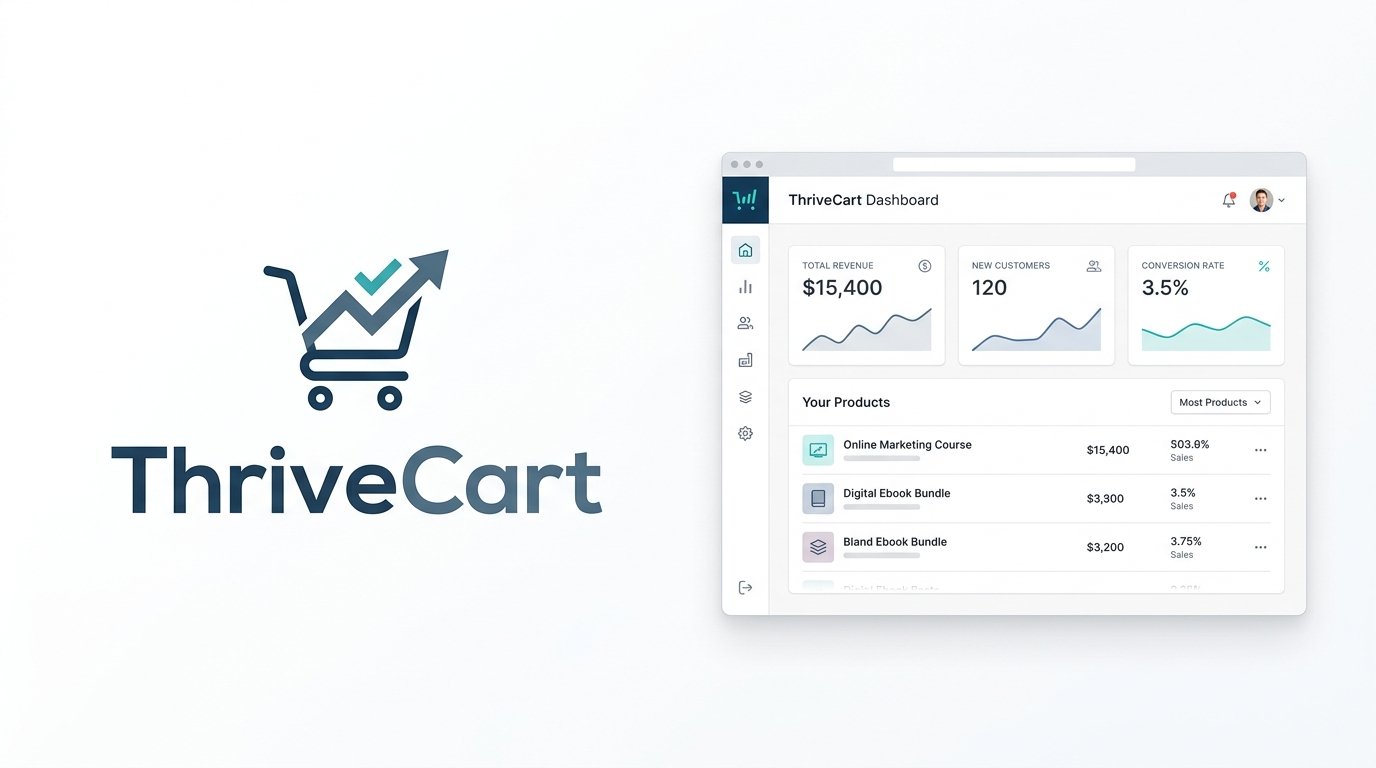
ThriveCart built its reputation as a high-converting checkout and cart platform, the kind of tool other course creators and coaches quietly used behind the scenes to boost order value with bumps and upsells. As of July 2026, it’s positioning itself more broadly as a checkout platform that has expanded into course and community hosting — bundling checkout, funnels, subscriptions, affiliates, and a course/community platform called ThriveCart Academy under one account.
This review breaks down ThriveCart’s current pricing, features, fee structure, pros and cons, and top alternatives to help you decide if it fits how you sell.
On this page
Quick Verdict
| Overall Rating | ⭐ 4.5 / 5.0 |
| Best For | Creators who want a high-converting checkout and funnel builder bundled with course and community hosting, without paying a percentage of every sale |
| Starting Price | $47/month billed monthly ($37/month billed annually) for the Standard plan |
| Free Trial | 30-day free trial on subscription plans (card required, no charge until the trial ends) |
| Core Features | High-converting checkout & funnels, order bumps and upsells, subscription billing, built-in course & community hosting (ThriveCart Academy), affiliate management, automated sales-tax calculation and collection |
| E-commerce & Fees | 0% platform transaction fee on sales, on every plan including Enterprise. ThriveCart’s sales tax automation carries its own surcharge, though: 0.5% on Standard, 0.35% on Pro+ accounts created after May 1, 2026 (free on older Pro+ accounts). Standard payment processing rates apply on top. |
Pros & Cons
Pros
- 0% Platform Transaction Fees: ThriveCart doesn’t take a percentage of your sales on any plan, including Enterprise — you keep the sale revenue apart from payment-processing costs and ThriveCart’s separate sales-tax surcharge, if you use that feature.
- Built for Conversion: Order bumps, one-click upsells and downsells, and A/B testing on checkout pages are core features, not bolted-on extras — ThriveCart says combining bumps, upsells, and downsells can increase average order value by up to 118%.
- Now Includes Course & Community Hosting: ThriveCart Academy bundles unlimited courses and students, community spaces with gamification and certificates, and video hosting into every plan — you’re no longer just buying a checkout tool.
- 30-Day Free Trial: New subscription plans include a 30-day free trial, giving you time to test the checkout and Academy features before being charged.
- Broad Payment Support: Checkout works across 100+ countries, with support for Buy Now Pay Later options (Afterpay, Klarna, Affirm), multiple currencies, and even crypto payments on Pro+.
Cons
- Pricing Just Changed Significantly: ThriveCart moved from a one-time lifetime license to a monthly/annual subscription model in July 2026. Older reviews and coupon sites citing lifetime pricing may not reflect what’s actually on the current pricing page.
- Affiliate Program Requires Pro+: ThriveCart’s entire affiliate program — recruitment, tracking, and payouts — requires the $87/month (or $67/month annual) Pro+ plan. Standard has no affiliate functionality at all.
- Limited to One Order Bump on Standard: Multiple order bumps, one of ThriveCart’s headline conversion features, are gated to Pro+.
- Course Tools Are Less Deep Than Dedicated Platforms: ThriveCart Academy covers courses, quizzes, and certificates, but it’s newer to this space than platforms like Thinkific or Teachable and doesn’t yet match their depth on structured learning tools.
Ready to try ThriveCart?
Who Should Use ThriveCart?
Choose ThriveCart if:
- You want a checkout and funnel builder built specifically to increase average order value, with bumps, upsells, and downsells as core functionality.
- You want to avoid percentage-based transaction fees entirely and are comfortable paying a monthly or annual subscription instead.
- You want course and community hosting bundled with your checkout rather than managing two separate platforms.
- You sell subscriptions or recurring memberships and want built-in dunning and subscription management.
Look Elsewhere if:
You want deep, structured course tools like graded assignments, compliance tracking, and advanced quizzes as your primary need — a dedicated platform like Thinkific will go further (see our Thinkific Review).
You’d rather pay a small percentage per sale with no monthly commitment at all — Gumroad and Lemon Squeezy both work this way (see our Gumroad Review and Lemon Squeezy Review).
You want every feature available on every plan regardless of price — Payhip doesn’t gate features behind higher tiers the way ThriveCart does (see our Payhip Review).
Key Features
1. Checkout & Conversion Tools
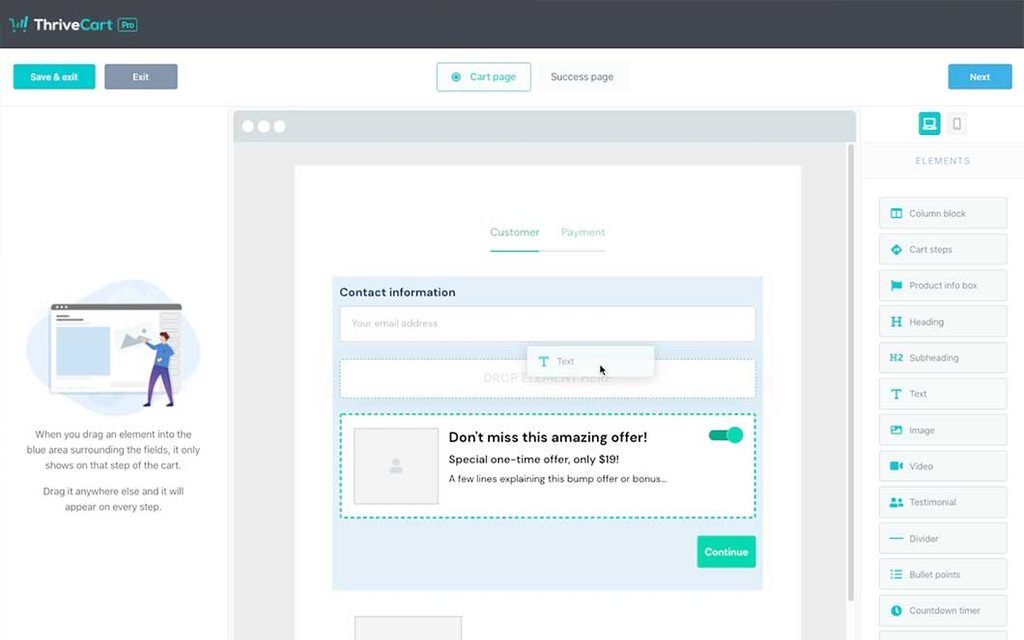
- High-Converting Checkouts: Choose modal, single-page, or multi-step checkout layouts designed to match your brand and reduce drop-off.
- Funnels & Order Bumps: Build a specific path buyers take through your offers, with order bumps, one-click upsells and downsells, and automatic access rules. Standard includes one order bump; Pro+ unlocks multiple.
- A/B Testing: Split test checkout pages or full funnels to compare layouts and offers side by side.
2. Payments & Compliance
- Broad Payment Support: Checkout is available in 100+ countries with support for major payment processors, multiple currencies, and Buy Now Pay Later options like Afterpay, Klarna, and Affirm.
- Sales Tax Automation: Automated tax calculation and collection at checkout in supported regions, including the U.S., Canada, EU, UK, Switzerland, Norway, and Liechtenstein. ThriveCart does not file or remit the collected tax on your behalf. Tax-inclusive pricing is a separate Pro+ feature.
- Compliance Tools: ThriveCart provides features designed to support payment security, privacy, and regional checkout requirements, including PCI-DSS and GDPR-related functionality.
3. Subscriptions & Affiliates
- Subscription Management: Handle trials, renewals, upgrades, downgrades, and cancellations automatically, with subscription dunning and analytics available on Pro+.
- Affiliate Program: ThriveCart’s affiliate program — recruiting affiliates, tracking, revenue splits, payouts, and joint venture contracts — is a Pro+-only feature. It isn’t available at all on Standard.
4. ThriveCart Academy (Courses & Community)
- Course Hosting: Every plan includes unlimited courses and students, with gamification, quizzes, and certificates built in.
- Community Spaces: Standard includes up to 10 communities and 2,000 community members; Pro+ steps up to unlimited communities and 10,000 members with a custom community domain.
- Video Hosting: Standard includes 100 GB of video storage with a 2 GB max file size; Pro+ increases this to 500 GB storage and 4 GB max file size, both with HD (1080p) streaming.
Pricing
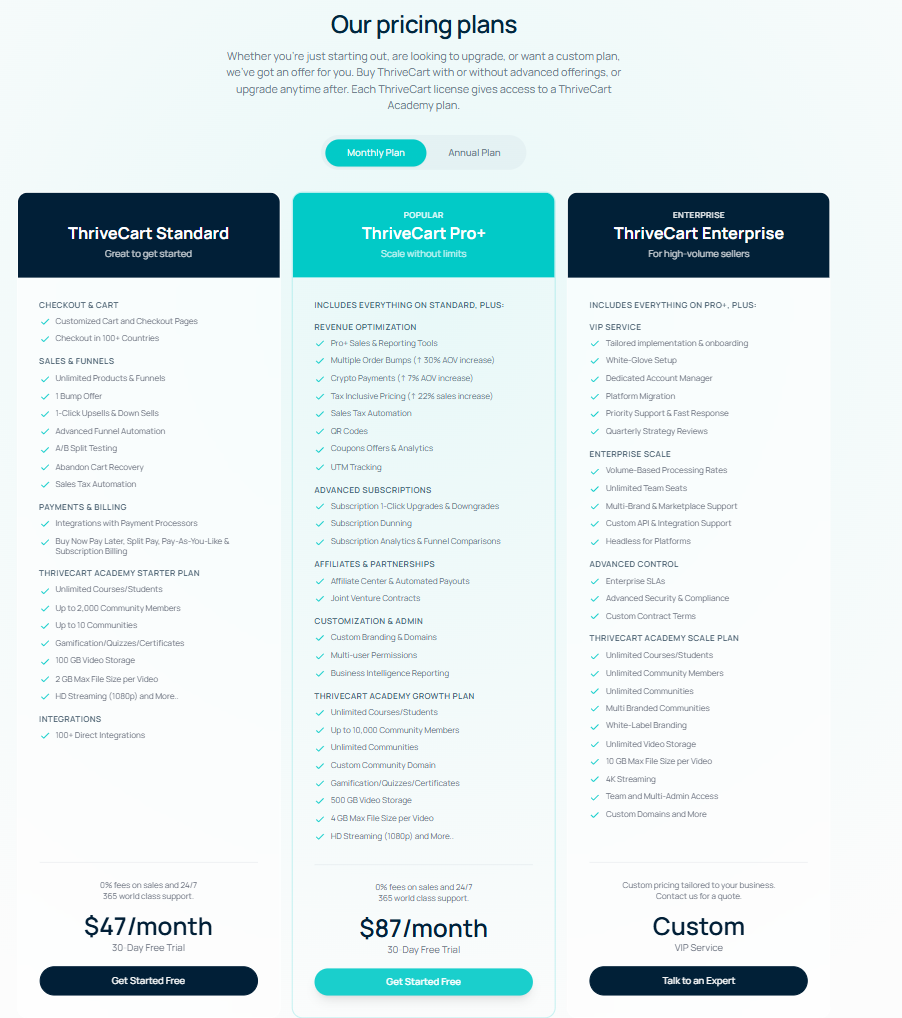
ThriveCart’s pricing changed significantly in July 2026, moving from a lifetime-only model to subscription plans as the primary offer.
- Standard ($47/month billed monthly, $37/month billed annually): Checkout and cart customization, unlimited products and funnels, one order bump, 1-click upsells/downsells, A/B testing, abandoned cart recovery, sales tax automation (0.5% surcharge applies), and the Starter tier of ThriveCart Academy (unlimited courses/students, up to 2,000 community members, up to 10 communities, 100 GB video storage). No affiliate program on this tier.
- Pro+ ($87/month billed monthly, $67/month billed annually): Everything in Standard, plus multiple order bumps, crypto payments, tax-inclusive pricing, QR codes, coupon analytics, UTM tracking, subscription dunning and analytics, the full affiliate program with automated payouts and joint venture contracts, custom branding and domains, multi-user permissions, and the Growth tier of ThriveCart Academy (up to 10,000 community members, unlimited communities, custom community domain, 500 GB video storage). Sales tax surcharge is 0.35% on accounts created after May 1, 2026.
- Enterprise (custom pricing): Everything in Pro+, plus white-glove onboarding, a dedicated account manager, custom API support, unlimited team seats, and the top Academy tier with unlimited storage and 4K streaming. Still charges 0% platform commission, with negotiated, volume-based payment processing rates as a separate enterprise benefit.
ThriveCart also continues to support existing lifetime licenses, while the current public offer is centered on monthly and annual subscriptions. If a one-time lifetime purchase is important to you, check ThriveCart’s current sales options directly rather than assuming one is displayed on the main pricing page.
On fees: Standard and Pro+ both charge 0% platform commission on your sales — you only pay your payment processor’s standard rates (typically around 2.9% + $0.30, depending on processor and region), plus the sales-tax surcharge described above if you use that feature.
Looking for other choices? See our top picks for the Best Digital Product Platforms for Creators
Top Alternatives
- Gumroad: A simpler, lower-commitment alternative if you’re selling straightforward digital downloads and don’t need funnels or course hosting — no monthly fee, but a 10% + $0.50 cut on every sale instead.
- Kajabi: A better fit if course delivery and email marketing automation are your primary focus rather than checkout conversion tools — see our Kajabi Review.
- Payhip: Worth a look if you want every feature available regardless of plan, including physical product support, with a percentage fee that drops as you upgrade instead of a flat monthly cost.
Final Verdict
ThriveCart remains one of the strongest checkout and funnel tools available, and its move to 0%-fee subscription pricing with a real trial in July 2026 makes it more approachable than the lifetime-only model it ran for years. Bundling in course and community hosting through ThriveCart Academy pushes it further into territory once reserved for dedicated platforms like Kajabi or Teachable.
The tradeoff is that ThriveCart’s entire affiliate program and some of its best conversion features, like multiple order bumps, are reserved for Pro+, and its course tools, while genuinely useful, aren’t as deep as platforms built around teaching first. For creators who care most about checkout conversion and want course hosting as a bonus rather than the main event, ThriveCart is a strong, fee-free option.
FAQ
Does ThriveCart charge transaction fees? No. Standard, Pro+, and Enterprise all charge 0% platform commission — you only pay your payment processor’s standard card processing fees. ThriveCart’s sales tax automation carries its own separate surcharge (0.5% on Standard, 0.35% on newer Pro+ accounts) if you use that feature.
Is ThriveCart still available as a one-time lifetime payment? ThriveCart continues to support existing lifetime licenses, but as of July 2026 the current public offer centers on monthly and annual subscriptions rather than a displayed lifetime price. If a one-time purchase matters to you, check with ThriveCart directly rather than assuming it’s available at a specific price.
Does ThriveCart have a free trial? Yes, as of July 2026. New subscribers get a 30-day free trial with a card on file, with no charge until the trial ends.
Does ThriveCart handle sales tax filing for me? Not entirely. ThriveCart’s sales tax automation calculates and collects tax at checkout in supported regions, but it doesn’t file or remit that tax to authorities on your behalf — that responsibility stays with you.
Can I run an affiliate program on ThriveCart? Only on Pro+. ThriveCart’s affiliate program — recruiting affiliates, tracking, and payouts — isn’t available on the Standard plan at all.
Can I host courses and manage a community with ThriveCart? Yes. ThriveCart Academy is bundled into every plan, with unlimited courses and students, gamification, quizzes, and certificates. Community capacity and video storage limits scale up with the Pro+ and Enterprise plans.
Compare ThriveCart with
Disclosure: StackDrawer is reader-supported. If you purchase through certain links on this site, we may earn an affiliate commission at no additional cost to you. Learn more in our Affiliate Disclosure.