
Sellfy’s pitch is simple: a single flat monthly fee, 0% transaction fees across every plan, and a store that handles digital downloads, subscriptions, print-on-demand, and physical products without stitching together separate tools. That 0% figure is the headline on its own pricing page, but it comes with a sales-volume ceiling per plan that’s easy to miss if you only skim the marketing copy. This review covers what’s actually included at each tier, based on Sellfy’s official pricing page and its full feature-comparison table.
On this page
Quick Verdict
| Overall Rating | Mixed by source: 4.2/5 on Trustpilot (71 reviews), 4.5/5 on Capterra (32 reviews), 3.9/5 on G2 (58 reviews) |
| Best For | Creators selling digital downloads, subscriptions, or print-on-demand who want a flat monthly fee with no percentage cut |
| Starting Price | $22/month (Starter, billed annually) |
| Free Trial | 14 days |
| Transaction Fees | 0% on every plan, up to each plan’s annual sales cap — a 2% overage fee can apply beyond that if you don’t upgrade |
| Money-Back Guarantee | Full refund within 30 days of upgrading to a paid plan |
Pros & Cons
Pros
- 0% platform transaction fee on every plan — you only pay standard Stripe/PayPal processing (around 2.9% + 30¢) on top
- Unlimited products on every plan, across digital downloads, physical products, subscriptions, and print-on-demand
- Store editor, themes, custom code, and connecting your own domain are included even on the cheapest Starter plan
- A clean, clearly stated 30-day money-back guarantee after upgrading
- Free email contact migration on every plan, and multiple independent reviews consistently describe setup as fast and beginner-friendly
Cons
- The 0% fee is capped by an annual sales ceiling per plan ($10k Starter, $50k Business, $200k Premium) — go over it without upgrading and Sellfy can start charging a 2% overage fee
- Sellfy’s own pages give conflicting answers on which plan includes product migration: the comparison table marks it Premium-only, while the FAQ text says it’s available on “Business and Premium” — worth confirming directly with support before you count on it
- Removing Sellfy’s own branding from your store requires Business ($59/month) or above — Starter keeps it
- Upselling, cart abandonment recovery, and the affiliate program are all locked behind Business and up
- Review-site ratings vary more than most platforms in this category — G2 (3.9/5) sits noticeably lower than Capterra (4.5/5), with limited customization being the most repeated complaint once you need something the editor doesn’t support
Ready to try Sellfy ?
Who Should Use Sellfy?
Sellfy suits creators selling digital products, subscriptions, or print-on-demand merchandise who want predictable costs — a flat monthly fee rather than a percentage cut on every sale — and don’t need a deeply customizable storefront. It’s a reasonable fit for selling directly on social platforms too, since Sellfy doesn’t require you to have your own website; you can sell through embeddable buy buttons or a standalone store page.
It’s a weaker fit if you expect to clear your plan’s annual sales cap regularly, since you’ll either need to upgrade preemptively or risk the 2% overage fee. It’s also not the platform for sellers who need deep store customization — several independent reviews describe hitting a wall once you need an edit beyond what the built-in editor supports, and physical-product sellers with more complex catalog needs are generally better served by a dedicated ecommerce platform.
Key Features
Products. Digital downloads, physical products, subscriptions, and print-on-demand are all included — and unlimited — on every plan, including Starter. Maximum file size per digital product scales by plan: 10GB on Starter, 15GB on Business, 20GB on Premium, with up to 50 files per product.
Transaction Fees. Sellfy charges 0% on every plan. The only costs are your payment processor’s standard rate (PayPal or Stripe, typically around 2.9% + 30¢) and each plan’s annual sales cap: $10k on Starter, $50k on Business, $200k on Premium. Exceed the cap without upgrading, and Sellfy says it may start charging a 2% fee on revenue above the limit.
Store Customization. The store editor, built-in themes, custom code injection, and connecting your own domain are included on every plan, even Starter. Removing Sellfy’s own branding from your store is a Business-and-up feature.
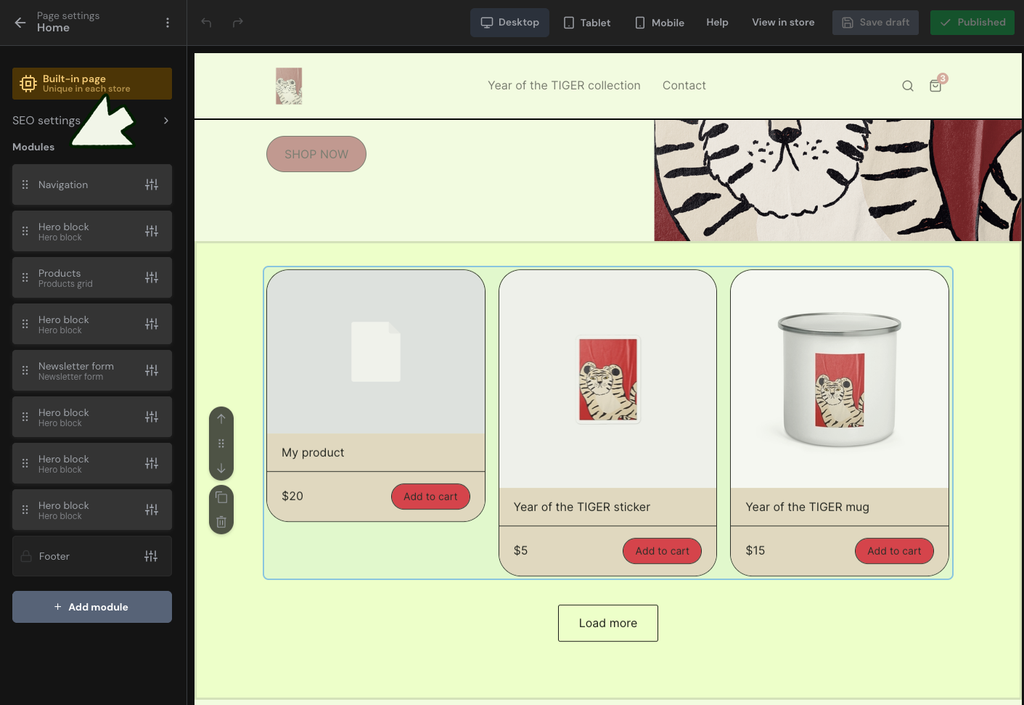
Marketing Tools. Coupon codes, customer reviews, and built-in email marketing are included on every plan, with free monthly email credits scaling from 2,000 (Starter) to 10,000 (Business) to 50,000 (Premium). Product upselling, cart abandonment recovery, and an affiliate program are all gated to Business and above.
Migration. Free email contact migration is available on every plan (1–2 business days). Store design migration — rebuilding your existing site’s look inside Sellfy — is available on Business and Premium, though Sellfy’s FAQ specifies this requires an annual subscription on those plans. Product migration (uploading your product files and descriptions for you) is listed as Premium-only in Sellfy’s plan comparison table, but its FAQ text separately describes it as a Business-and-Premium feature — the two pages don’t agree, so confirm directly with Sellfy before assuming Business includes it.
Other notable features
- PayPal and Stripe are the only supported payment gateways; if neither is available in your country, Sellfy can only be used to offer free products
- Advanced VAT and tax settings, a free SSL certificate, and mobile-optimized stores are included on every plan
- 24/7 email support on every plan; priority support is Premium-only
- Payments are sent directly to your connected PayPal or Stripe account instantly after each purchase
Pricing
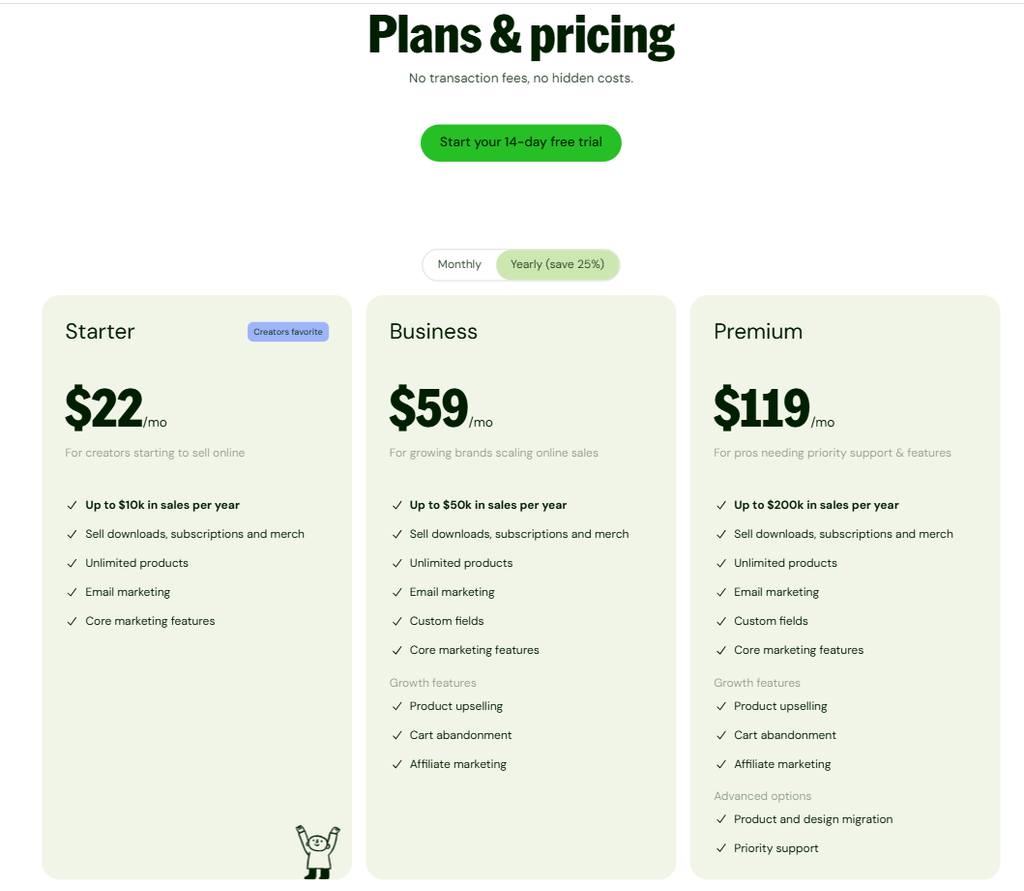
Prices below are for annual billing (saves 25%); monthly billing costs more. All figures come directly from Sellfy’s official pricing page.
- Starter — $22/month annual ($29/month billed monthly): Up to $10k in annual sales. 10GB max file size, 2,000 free email credits. No custom fields, branding removal, upselling, cart abandonment, affiliate program, or migration beyond email contacts.
- Business — $59/month annual ($79/month billed monthly): Up to $50k in annual sales. 15GB max file size, 10,000 free email credits. Adds custom fields, branding removal, upselling, cart abandonment, affiliate program, and store design migration (on annual billing).
- Premium — $119/month annual ($159/month billed monthly): Up to $200k in annual sales. 20GB max file size, 50,000 free email credits. Adds priority support and product migration, plus everything in Business.
Over $200k/year in sales? Sellfy offers custom pricing for high-volume sellers — contact them directly.
Trial and refunds: 14-day free trial. Sellfy states that if it’s not working out for you, you can get a full refund within 30 days of upgrading to a paid plan — one of the more clearly stated refund policies among the platforms we’ve reviewed in this category.
Looking for other choices? See our top picks for the Best Digital Product Platforms for Creators
Top Alternatives
Gumroad is the most common comparison — it charges a percentage-based transaction fee rather than Sellfy’s flat subscription, which can work out cheaper at very low volume and more expensive as you scale, the opposite trade-off from Sellfy’s sales-cap model. If you need deeper store customization or a wider range of physical-product and inventory tools, a fuller ecommerce platform is generally a better fit than Sellfy’s more limited editor. For course-heavy digital products specifically, a dedicated course platform will offer far more structured learning tools than Sellfy’s product-download model.
Final Verdict
Sellfy’s 0% transaction fee is real and meaningfully different from competitors that take a percentage of every sale, but it’s not the unconditional deal the homepage headline suggests — each plan has an annual sales ceiling, and crossing it without upgrading can mean a 2% overage fee instead. For creators selling digital downloads, subscriptions, or print-on-demand at a predictable volume under their plan’s cap, Sellfy offers a genuinely simple, flat-cost way to sell without a percentage cut. For anyone expecting rapid growth past the entry-tier caps, or who needs more store customization than the built-in editor allows, it’s worth weighing against alternatives before committing.
FAQ
How much does Sellfy cost? Starter is $22/month billed annually ($29 monthly), Business is $59/month annually ($79 monthly), and Premium is $119/month annually ($159 monthly). A 14-day free trial is available, and custom pricing exists for sellers doing more than $200k/year.
Does Sellfy charge transaction fees? No — Sellfy charges 0% on every plan. You still pay your payment processor’s standard fee (PayPal or Stripe, typically around 2.9% + 30¢), and if you exceed your plan’s annual sales cap without upgrading, a 2% overage fee can apply to the excess revenue.
What happens if I go over my plan’s sales limit? Sellfy says it will notify you and expects you to upgrade to the next plan. If you don’t upgrade, it may begin charging a 2% fee on the revenue that exceeds your current plan’s cap.
Can I remove Sellfy’s branding from my store? Only on Business ($59/month annual) and Premium. Starter keeps Sellfy branding visible.
Is Sellfy good for physical products? It supports physical products and print-on-demand on every plan, but independent reviews generally describe it as stronger for digital-first sellers than for complex physical-inventory stores.
Compare Sellfy with
- Gumroad
- Shopify
- LearnWorlds
Disclosure: StackDrawer is reader-supported. If you purchase through certain links on this site, we may earn an affiliate commission at no additional cost to you. Learn more in our Affiliate Disclosure.