
Brevo (formerly Sendinblue) positions itself as an all-in-one platform for email, SMS, automation, light CRM tools, and transactional messaging. Its pricing works differently from most email tools: you pick a plan, then choose how many emails you want to send each month, and on Starter and Standard that tier also sets how many contacts you can store. This review covers what each plan includes, where the limits show up, and who Brevo actually suits.
On this page
Quick Verdict
| Overall Rating | ⭐4.5/5 (G2, 2,500+ reviews) |
| Best For | Small businesses that want email, SMS, and transactional messaging in one place, with pricing based on send volume |
| Starting Price | From $9/month (Starter, 5,000 emails/month; 10% off with yearly billing) |
| Free Trial | No timed trial; a free plan with no credit card required |
| Free Plan | Yes: 300 emails/day, up to 100,000 contacts, 1 marketing seat |
| Pricing Model | Based on monthly email volume; on Starter and Standard the tier also caps stored contacts |
Pros & Cons
Pros
- A free plan that doesn’t expire: 300 emails per day and storage for up to 100,000 contacts
- Paid plans are priced by email volume, which can suit businesses with larger lists that send occasionally
- Transactional email (API, SMTP, webhooks) is available on every plan, so marketing and system emails can live in one account
- Email, SMS, web push, live chat, and basic sales tools sit in the same platform, with WhatsApp from Professional
- Automation, A/B testing, and AI send time optimization arrive at Standard, starting from $18/month
- Built-in sales tools are free on every plan, including 1 pipeline and up to 50 open deals
- Optional AI features (Aura) and an MCP connection for managing campaigns from ChatGPT or Claude
Cons
- Contact storage is tied to your email tier on Starter and Standard: the lowest tiers store only 500, 1,500, or 2,500 contacts, and exceeding the cap triggers an automatic tier upgrade
- The Brevo logo stays in your emails on Starter unless you pay a $9/month add-on
- Automation on the Free and Starter plans is capped at 2,000 contacts, and A/B testing, landing pages, and advanced reports start at Standard
- The jump from Standard to Professional is steep: Professional starts at $499/month
- WhatsApp, contact scoring, AI segmentation, and 10 marketing seats are Professional-only
- Extras add up: extra marketing seats on Standard are $12/month each, Sales Essentials is $31/month, and SMS credits are bought separately
- The pricing page uses a volume selector, so exact costs above the entry tiers require checking the live page
Ready to try Brevo?
Who Should Use Brevo?
Brevo fits small businesses, ecommerce stores, and creators who want more than a newsletter tool but don’t want to assemble email, SMS, and transactional messaging from separate products. Because pricing follows send volume rather than list size alone, it can work well if you have a large list you email a few times a month.
It’s also a practical choice for site owners and developers who need transactional email, since SMTP, API access, and webhooks are included on every plan. Brevo integrates with 150+ tools, including Shopify, WordPress, Stripe, and Zapier.
It’s a weaker fit if you want a creator-first newsletter tool built around subscriber growth and paid products. Newsletter-focused platforms like Kit are designed for that workflow. It’s also less attractive if you need deep CRM and advanced automation at a low price, or if you want WhatsApp without committing to the $499/month Professional plan.
Key Features
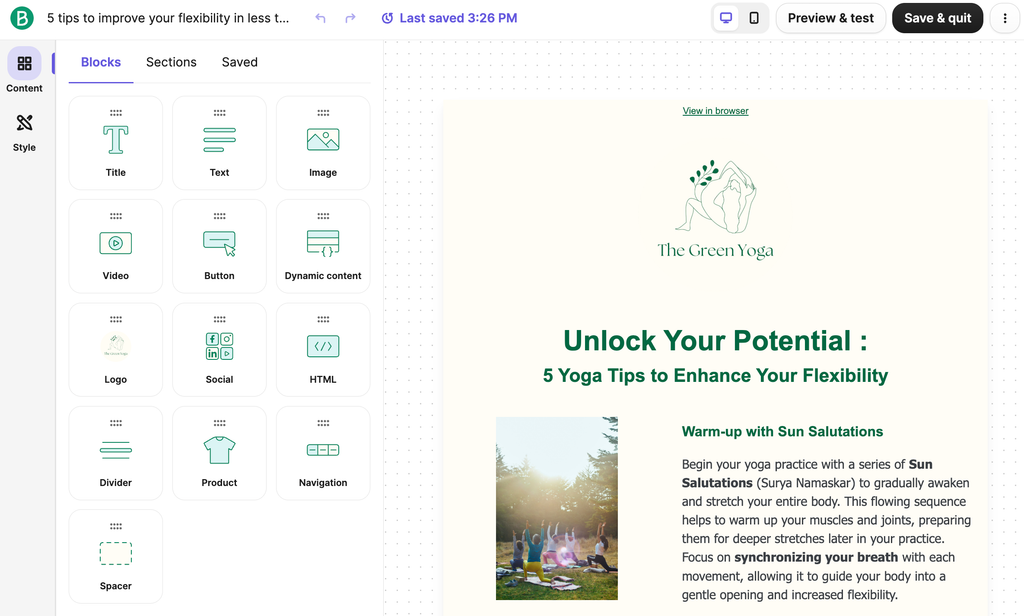
Email Campaigns. Brevo includes a drag-and-drop editor, reusable templates, and forms for capturing leads. Starter and above add an AI content generator for subject lines and copy, plus advanced segmentation based on demographics, website activity, and campaign engagement. The editor and templates are available on the free plan too, so you can see the basics before paying.
Marketing Automation. Automation is where plan limits matter most. The Free and Starter plans include multi-channel automation capped at 2,000 contacts. Standard removes that cap and adds A/B testing, AI send time optimization (it picks when each contact is most likely to engage), and web and event tracking for triggering messages from on-site behavior. If automation is the reason you’re shopping, Standard is the realistic starting point.
Transactional Email and SMS. Every plan includes transactional email through an API or SMTP relay, plus outbound webhooks. Logs are stored with no time limit by default (for accounts under 10 million events), and you can set your own retention rules; larger accounts fall under a separate retention policy, with extended retention as a paid Enterprise option. SMS campaigns are available on every plan, but SMS credits are sold separately. This is one of Brevo’s clearest advantages over newsletter-only tools.
Aura AI and MCP. Brevo’s AI layer, Aura, helps with copy, segmentation, and send timing. Professional adds AI segmentation and an AI Data Analyst that answers questions about your data in plain language. Brevo also offers an MCP connection so you can manage campaigns and contacts from ChatGPT or Claude.
Other notable features
- Free built-in sales tools on every plan: 1 pipeline, up to 50 open deals, meeting scheduling, and live chat
- Landing pages: 1 on Standard, 10 on Professional
- Web push notifications from Starter, with WhatsApp campaigns and mobile push on Professional
- Contact scoring (including RFM and CLV) and ecommerce recommendations on Professional
- 3 hours per year with a deliverability strategist on Professional
- A 20% discount for verified non-profits
Pricing
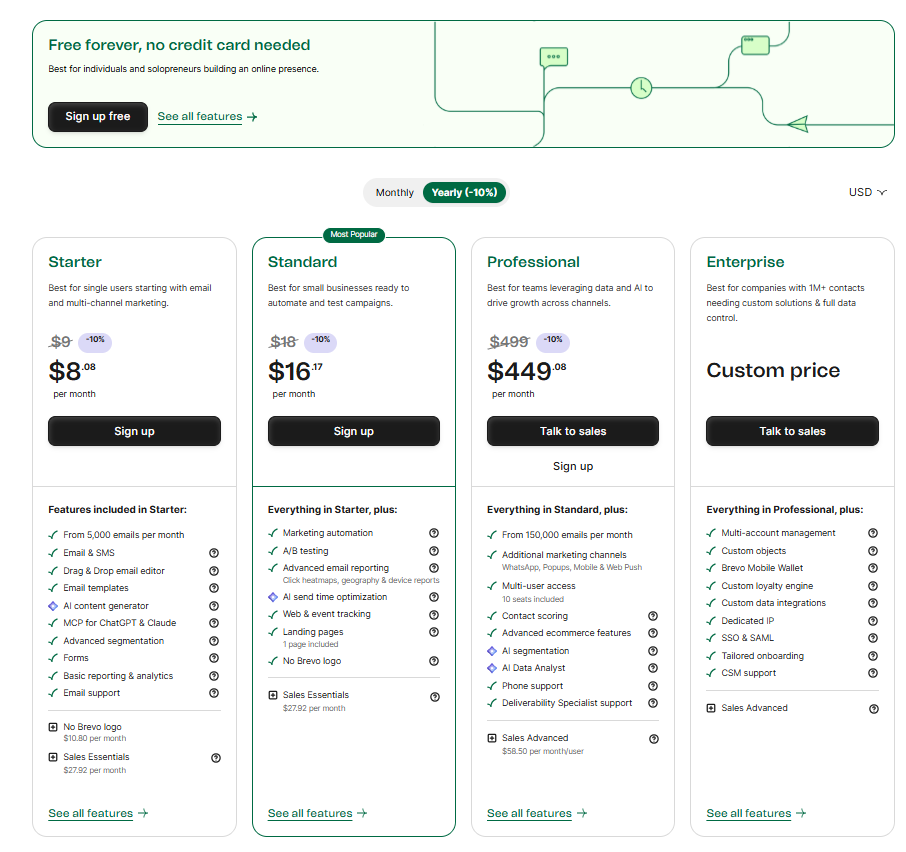
Brevo has five plans. Paid plans are billed monthly or yearly, and yearly billing takes 10% off. Listed prices exclude taxes.
- Free: $0. 300 emails per day, up to 100,000 contacts, 1 marketing seat, drag-and-drop editor, templates, transactional email, basic reporting, and email support.
- Starter: from $9/month. No daily sending limit and tiers starting at 5,000 emails/month. Adds an AI content generator, advanced segmentation, and web push. The Brevo logo remains unless you add logo removal for $9/month.
- Standard: from $18/month. Adds unlimited-contact automation, A/B testing, AI send time optimization, advanced reports, web and event tracking, 1 landing page, and no Brevo logo. Up to 3 marketing seats through add-ons.
- Professional: from $499/month. Starts at 150,000 emails/month, with 10 seats, WhatsApp (credits are an add-on), contact scoring, AI segmentation, 10 landing pages, and phone support.
- Enterprise: custom pricing. Adds unlimited seats, sub-account management, SSO, a dedicated IP, and a dedicated success manager.
On Starter and Standard, your email volume tier decides how many contacts you can store:
| Monthly emails | Contacts stored |
|---|---|
| 5,000 | Up to 500 |
| 10,000 | Up to 1,500 |
| 15,000 | Up to 2,500 |
| 20,000–100,000 (Starter) or 20,000–500,000 (Standard) | Up to 500,000 |
Brevo upgrades you to the next tier automatically if you pass your contact cap, so your bill can rise without a plan change on your part. Watch this if your list is growing.
Extras to budget for: Sales Essentials at $31/month and Sales Advanced at $64/month, prepaid SMS and WhatsApp credits, and a dedicated IP at $251/year on Professional. Costs above the entry tiers depend on the volume you select, so use the live pricing page for your exact number.
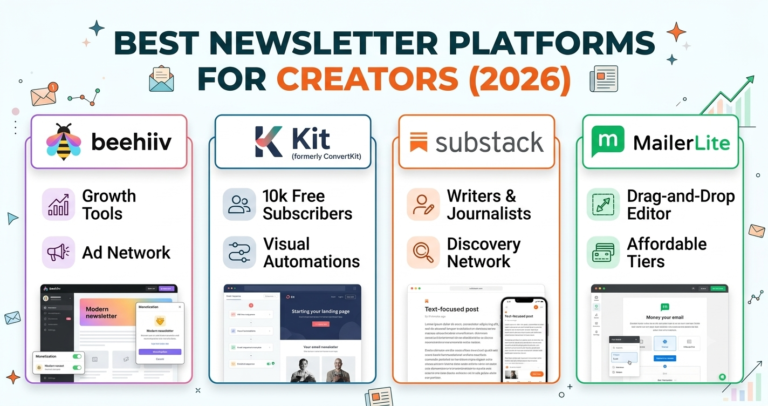
Looking for other choices? See our top picks for the Best Newsletter Platforms for Creators
Top Alternatives
If you want deeper automation and a fuller CRM, ActiveCampaign is the stronger option, with a steeper learning curve and contact-based pricing. If you want something simple and newsletter-first, MailerLite and Kit are worth a look, and Kit in particular is built around creator workflows. Choose Brevo over these when transactional email, SMS, or send-volume pricing matters more than a polished newsletter experience.
Final Verdict
Brevo is a practical, budget-conscious platform for businesses that want email, SMS, and transactional messaging under one roof. The free plan is generous enough to test the basics properly, and the $18/month Standard plan is where automation and testing become available. The trade-offs are plan limits that are easy to overlook (contact caps tied to volume, the logo on Starter, automation limits on lower plans) and a big price jump to Professional. If you want a simple creator newsletter, a newsletter-first tool may suit you better. If you want an affordable all-in-one tool for marketing and system emails, Brevo deserves a shortlist spot.
FAQ
How much does Brevo cost? Brevo is free at the entry level, with paid plans from $9/month (Starter), $18/month (Standard), and $499/month (Professional). Enterprise is custom-priced. Yearly billing takes 10% off, prices exclude taxes, and your cost rises with the email volume you choose.
Does Brevo have a free plan? Yes. It includes 300 emails per day and storage for up to 100,000 contacts, with no credit card required and no time limit. Unused daily sends don’t roll over.
Does Brevo charge per contact? Mainly by email volume, not list size. But on Starter and Standard, the volume tier sets a contact storage cap, and exceeding it moves you up a tier automatically.
Can I send transactional emails on every plan? Yes. Brevo says all plans include transactional email features such as the API, SMTP, outbound webhooks, and configurable log retention.
Is Brevo good for beginners? Brevo says no prior experience is needed, and the free plan lets you judge the interface at no cost. Since this review is research-based, we’d suggest trying the editor and automation builder yourself before committing.
Is Brevo the same as Sendinblue? Yes. Sendinblue rebranded as Brevo.
Compare Brevo with
- ActiveCampaign
- Kit
- MailerLite
Disclosure: StackDrawer is reader-supported. If you purchase through certain links on this site, we may earn an affiliate commission at no additional cost to you. Learn more in our Affiliate Disclosure.