
Teachable and Thinkific are two leading online course platforms, but they take fundamentally different approaches to helping creators sell knowledge online. Teachable focuses on streamlined sales tools, single-checkout flows, and automated global tax compliance. Thinkific, on the other hand, prioritizes advanced instructional design, deep site customization, and 0% platform transaction fees on every plan.
On this page
Quick Summary
| Teachable | Thinkific | |
|---|---|---|
| Best For | Solo creators wanting automated sales tax & fast checkout | Educators wanting site control & unlimited course publishing |
| Starting Price (Annual) | $29/mo (Starter) | $40/mo (Basic) |
| Free Trial | 7-day free trial | 30-day free trial |
| Transaction Fees | 7.5% on Starter; 0% on Builder, Growth, and Custom plans | 0% on all plans via Thinkific Payments |
| Course Limits | 5 (Starter), 10 (Builder), 50 (Growth) | Unlimited courses on all plans |
| Student Cap | 1,000 (Starter/Builder), 5,000 (Growth) | 10,000 active students (Basic/Start/Grow) |
| Course Builder | Linear module & lesson editor | Advanced (assignments, quizzes, surveys, compliance) |
| Tax Compliance | Automated US Sales Tax & EU VAT (teachable:pay) | TCommerce tax tools available; not a merchant of record like Teachable. |
| Site Customization | Structured templates | Drag-and-drop theme builder with HTML/CSS access |
| Communities | Basic lesson comments & community channels | Native dedicated community spaces |
Quick Recommendation:
Choose Teachable if you want automated backend tax management (EU VAT & US sales tax), simplified checkout workflows, and a streamlined platform to sell courses, downloads, and coaching side-by-side.
Choose Thinkific if you want to publish an unlimited catalog of courses without product caps, need advanced educational features like graded assignments and compliance, and want full control over your website design.
Feature Comparison
1. Course Creation & Student Experience
- Thinkific provides deeper instructional design tools for creators running formal online academies. It supports video, audio, PDFs, Typeform surveys, automated quizzes, and graded student assignments. You can enforce course compliance (requiring students to watch a video or pass a quiz before advancing) and issue automated completion certificates starting on the Start plan ($82/mo when billed annually).
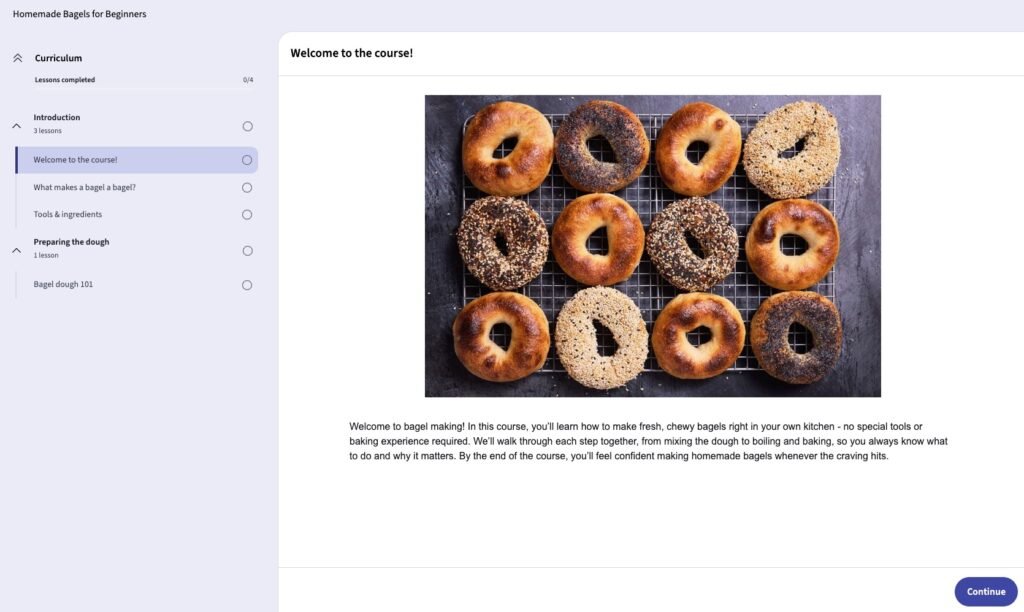
- Teachable : Keeps course structure simple and easy to navigate. Content is organized into sections and lectures supporting video, text, quizzes, files, and completion certificates on all current plans.
2. Website Builder & Customization
- Thinkific Provides customizable site themes and a visual drag-and-drop page editor. HTML and CSS editing is available on the Start plan and above, giving creators more control over site design and functionality. You can build complete multi-page websites, custom landing pages, and standalone sales pages without relying on external builders like WordPress or Webflow.
- Teachable uses structured, minimalist page templates. You can adjust colors, fonts, and banners, but overall layout flexibility is restricted. Customizing page structure requires adding CSS snippets or routing traffic through third-party landing page tools.
3. Marketing, Checkout & Tax Handling
- Teachable excels in back-office automation and checkout optimizations. Through Teachable Payments, Teachable automatically calculates, collects, and remits applicable U.S. sales tax, VAT, and GST in supported markets. It also features order bumps, 1-click upsells, automated abandoned cart recovery emails, and built-in affiliate payout management.
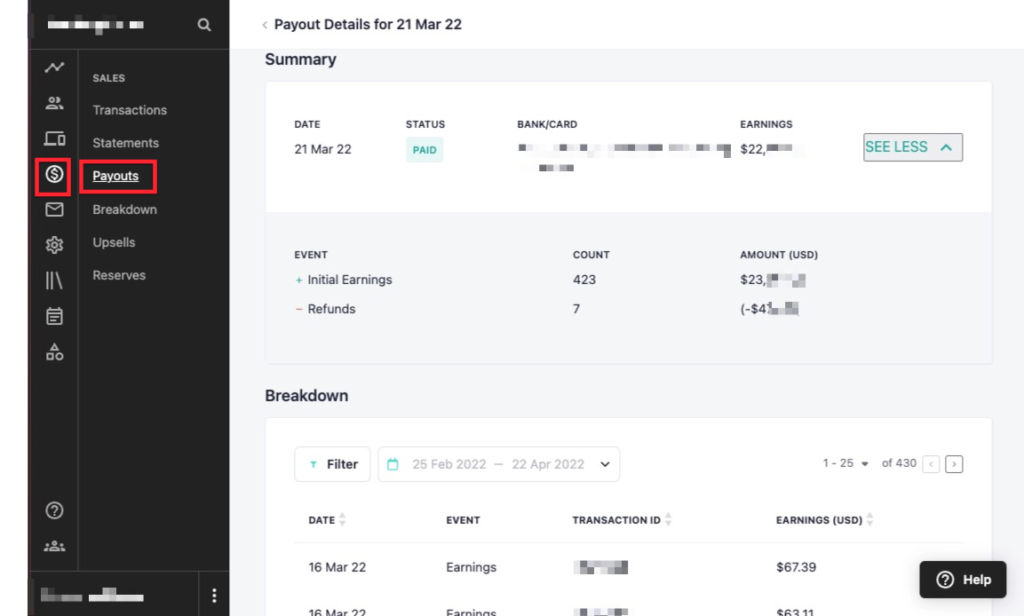
- Thinkific provides solid monetization options via Thinkific Payments, supporting order bumps, payment plans, and subscriptions with no third-party payment-gateway surcharge when using Thinkific Payments.. However, Thinkific does not operate as a merchant of record in the same way as Teachable. Tax obligations and filing responsibilities can therefore still depend on your business and the jurisdictions where you sell.
4. Communities & Memberships
- Thinkific includes native Communities across all plans. You can create dedicated discussion channels, host live events, attach communities to specific courses, and charge recurring subscription fees for community-only access.
- Teachable offers built-in community functionality for lesson comments and student interaction. However, its community structure is less modular than Thinkific’s and operates primarily as an add-on to individual course enrollments.
Pricing Comparison
Teachable Pricing Plans
- Starter ($29/mo annual / $39/mo monthly): 5 products, 1 admin seat, 7.5% platform transaction fee.
- Builder ($69/mo annual / $89/mo monthly): 10 products, 1,000 active students, 0% platform transaction fee.
- Growth ($139/mo annual / $189/mo monthly): 50 products, 5,000 active students, 5 admin seats, upsells.
- Advanced ($309/mo annual / $399/mo monthly): 100 products, up to 10,000 active students, custom user roles, advanced reporting.
Thinkific Pricing Plans
- Basic ($40/mo billed annually / $54/mo monthly): Unlimited courses, 1 community, up to 5 digital downloads, custom domain, abandoned-cart emails, and core e-commerce tools.
- Start ($82/mo billed annually / $109/mo monthly): Everything in Basic, plus live cohorts and coaching, completion certificates, assignments, bundles, upsells, payment plans, memberships, subscriptions, and HTML/CSS editing.
- Grow ($164/mo billed annually / $219/mo monthly): Everything in Start, plus 3 communities, removal of Thinkific branding, B2B/group orders, invoicing, API access and webhooks, student engagement reports, and phone/priority chat support.
- Plus: Custom pricing for higher-growth businesses that need advanced features, larger capacity, dedicated support, SSO, SCORM, CRM integrations, learning paths, and other enterprise capabilities.
Transaction Fees & Real Cost Analysis
- Teachable Starter Fee Trap: Teachable’s $29/mo Starter plan charges a 7.5% platform transaction fee per sale on top of standard payment processing (2.9% + $0.30). The simple subscription-price break-even point is about $533/month in sales ($40 ÷ 7.5%). Actual savings will depend on payment-processing fees, refunds, taxes, and the features you need.
- Thinkific 0% Fee Guarantee: Thinkific charges 0% platform transaction fees across all plans when using Thinkific Payments. (Note: If you choose to connect an external Stripe account instead of Thinkific Payments, Thinkific charges a 1%–5% gateway surcharge on lower plans).
Looking for other choices? See our top picks for the Best Course Platforms for Creators
Which Should you Choose?
Choose Teachable if:
- You want automated global sales tax and EU VAT remitting handled without third-party plugins.
- You plan to sell a mix of online courses, 1-on-1 coaching, and digital downloads.
- You want built-in affiliate management and tools for managing partner commissions.
Choose Thinkific if:
- You want to publish an unlimited number of courses while having room for up to 10,000 current students on the Basic, Start, and Grow plans.
- You need educational tools like graded assignments, prerequisites, and custom certificates.
- You want complete visual freedom over your brand’s sales pages without paying platform transaction fees.
Final Verdict
Thinkific is the better overall platform for educators and institutions who prioritize instructional depth, site customization, and publishing unlimited courses without transaction fees.
Teachable is the superior pick for solo creators and entrepreneurs who want a turnkey sales machine that removes backend tax and accounting friction.