
Thinkific is a leading online course creation and delivery platform designed for educators, subject matter experts, and growing businesses. Unlike all-in-one platforms that attempt to handle every aspect of digital marketing, Thinkific concentrates heavily on core learning experiences, course presentation, and flexible student management.
With unlimited course creation across all paid tiers and native payment tools, Thinkific offers a modular approach to building an online academy. However, key monetization features like memberships, payment plans, and completion certificates on Start and above.
This review covers Thinkific’s performance, key features, exact pricing plans, transaction fee structures, pros and cons, and top alternatives to help you decide if it fits your publishing strategy.
On this page
Quick Verdict
| Overall Rating | ⭐ 4.5 / 5.0 |
| Best For | Educators, coaches, and businesses seeking a dedicated course builder with unlimited course hosting and strong student engagement tools |
| Starting Price | $54/month billed monthly ($40/month billed annually) |
| Free Trial | 30-day free trial available on standard paid plans. |
| Core Features | Drag-and-drop course builder, unlimited video hosting, digital downloads, student communities, live cohorts, quizzes, and certificates |
| E-commerce & Fees | Thinkific Payments/TCommerce has no third-party payment-gateway surcharge. For creators in supported regions who continue using Stripe, Thinkific charges a third-party gateway fee of 5% on Basic, 2% on Start, and 1% on Grow. The fee applies to the first $1 million in annual sales; standard payment-processing fees also apply. |
| Mobile App | Native iOS and Android app for students to access courses and communities on the go, with some functions still requiring the web experience. |
Pros & Cons
Pros
- Unlimited Course Creation: All paid plans support unlimited courses and unlimited video hosting without individual upload caps.
- No Platform Fees via Thinkific Payments: Using native Thinkific Payments incurs 0% in platform surcharges.
- Strong Learning Tools: Built-in quizzes, assignments, drip schedules, live cohorts, and branded completion certificates.
- Integrated Student Communities: Host member discussion feeds, spaces, and live events directly alongside course content.
- Flexible Drag-and-Drop Site Builder: Easily create custom sales pages and curriculum structures without technical coding skills.
Cons
Basic Marketing Tools: Lacks advanced visual email automation pipelines found in dedicated all-in-one suites.
No Free Forever Plan: Thinkific retired its permanent free tier in favor of a 30-day free trial.
Third-Party Payment Surcharges: Creators who use Stripe instead of Thinkific Payments may pay an additional 5% on Basic, 2% on Start, or 1% on Grow on eligible transactions in supported regions.
Gated Core Monetization Features: Subscriptions, course bundles, certificates, and payment plans require the Start plan or higher.
Ready to try Thinkific ?
Who Should Use Thinkific?
Choose Thinkific if:
- You want to host and organize multiple online courses, digital downloads, and learning materials without restrictive content limits.
- You value structured learning tools, including quizzes, assignments, prerequisite lessons, and completion certificates.
- You plan to run live cohorts, webinars, or interactive group sessions using native calendar and Zoom integrations.
- You want an integrated student community space without relying on third-party forum plugins.
Look Elsewhere if:
You are operating primarily as a community platform with lightweight digital courses as a secondary feature (consider Circle or Skool).
You need an all-in-one sales engine with advanced email drip automations and complex visual sales funnels (consider our Kajabi Review).
You want a low-cost, pay-as-you-go platform with simple flat pricing for single products (consider our Teachable Review).
Key Features
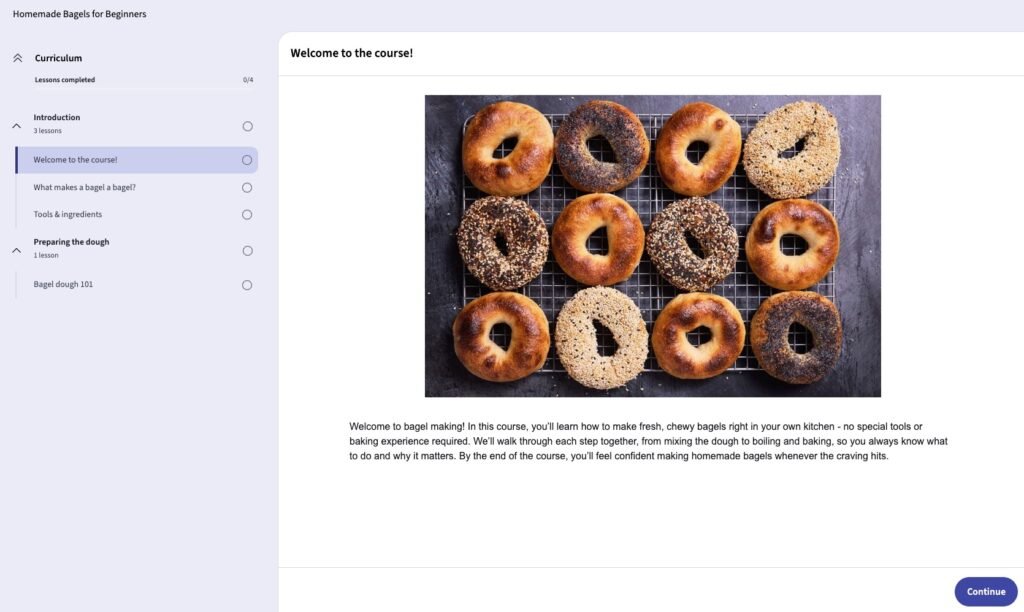
1. Digital Product & Course Builder
Thinkific focuses on delivering a smooth educational environment for both creators and enrolled students.
- Curriculum Management: Build structured courses with modules, video lessons, audio files, PDFs, presentations, and downloadable resources.
- Drip Scheduling & Prerequisite Rules: Control lesson availability by date or student progress, ensuring learners complete mandatory modules before moving forward.
- Quizzes, Assignments & Certificates: Evaluate student comprehension through graded quizzes and assignments. Automatically generate branded PDF certificates upon course completion (available on Start plan and above).
- Live Cohorts & Coaching: Integrate Zoom to host live lessons, group coaching, and interactive workshops with bookable calendar scheduling.
2. E-Commerce & Thinkific Payments (TCommerce)
Thinkific provides integrated order processing tools to manage sales, taxes, and customer billing directly.
- Thinkific Payments: Thinkific’s integrated payment solution supports major payment methods, including credit cards, Apple Pay, Google Pay, and supported buy-now-pay-later options.
- Tax Handling & Payouts: Thinkific Payments provides tools for sales-tax calculation, collection, reporting, and payouts in supported jurisdictions.
- Coupons, Bundles & Payment Plans: Offer discount codes, order bumps, payment installments, and product bundles to optimize order values.
3. Site Builder & Customization
Thinkific includes a modular drag-and-drop website builder tailored for digital product sales pages and course catalogs.
- Visual Page Sections: Select from pre-designed sections for course syllabi, instructor bios, testimonials, and FAQ blocks.
- Custom Domains & Branding: Connect custom web domains and adjust brand colors and typography. Developer-level HTML/CSS editing unlocks on the Start plan.
Looking for a standalone site builder instead? Read our guide to the best website builders.
4. Communities & Student Engagement
Thinkific integrates social learning spaces directly into your student portal.
- Community Spaces: Create dedicated discussion boards, private feeds, and member directories where students can interact.
- Live Events: Schedule and host live community events with automated event notifications and weekly digest emails.
Pricing
Thinkific offers three main pricing tiers, along with a custom enterprise solution. Paying annually saves 25% compared to monthly billing.
Basic Plan
- Monthly: $54/month
- Annual: $40/month ($480 billed annually)
- Includes: Unlimited courses, 1 community (with up to 5 spaces), up to 5 digital downloads, custom domain, abandoned-cart emails, coupon creation, and basic sales dashboards.
- Limitations: Does not include memberships, course bundles, certificates, or payment plans.
Start Plan (Most Popular)
- Monthly: $109/month
- Annual: $82/month ($984 billed annually)
- Includes: Everything in Basic, plus unlimited digital downloads, live cohorts/coaching (Zoom integration), completion certificates, assignments, course bundles, payment plans, memberships, and code editing (HTML/CSS).
Grow Plan
- Monthly: $219/month
- Annual: $164/month ($1,968 billed annually)
- Includes: Everything in Start, plus 3 communities, white-labeling (removal of Thinkific branding), mass email capabilities for student lists, advanced analytics, bulk order management, and phone support.
Thinkific+ (Enterprise)
- Pricing: Custom quote (contact sales)
- Includes: Unlimited communities, enterprise API, SCORM compliance, single sign-on (SSO), custom SLA agreements, and dedicated customer success management.
External Payment Gateway Surcharges
When using Thinkific Payments, Thinkific charges 0% in platform surcharges (standard card processing fees of ~2.9% + $0.30 apply).
If you choose to connect a external, standalone Stripe account instead of Thinkific Payments, Thinkific assesses an additional platform surcharge per transaction:
- Basic Plan: 5% surcharge
- Start Plan: 2% surcharge
- Grow Plan: 1% surcharge
Looking for other choices? See our top picks for the Best Course Platforms for Creators
Top Alternatives
Kajabi: A powerful all-in-one digital business suite that includes advanced email automation pipelines, CRM management, and comprehensive sales funnels.
Teachable: An accessible course builder featuring automated sales tax collection and lower starting costs for simple course launches.
Podia: A simplified digital store builder for creators selling downloads, courses, and webinars under an easy-to-use platform.
Final Verdict
Thinkific is a strong choice for educators, coaches, and businesses that want a dedicated course platform with flexible learning tools, communities, and built-in commerce. Its unlimited course creation and structured learning features make it particularly suitable for creators building a larger catalog of educational content.
Its main drawback is the higher price of the Start and Grow plans, especially for creators who need memberships, payment plans, certificates, or more advanced selling features. Thinkific is therefore a better fit for creators who expect to make use of its broader learning and commerce features rather than someone testing a single small course.
FAQ
Does Thinkific have a free plan? No. Thinkific retired its permanent free plan in favor of a full 30-day free trial on its paid tiers.
Does Thinkific charge transaction fees? Thinkific charges 0% platform transaction fees when processing payments through Thinkific Payments. Connecting an external Stripe account incurs a platform surcharge of 5% on Basic, 2% on Start, or 1% on Grow.
Can I offer course completion certificates on Thinkific? Yes, but completion certificates are available starting on the Start plan and above.
Can I remove Thinkific branding from my website? Full removal of Thinkific branding (white-labeling) is available on the Grow plan and above.
Disclosure: StackDrawer is reader-supported. If you purchase through certain links on this site, we may earn an affiliate commission at no additional cost to you. Learn more in our Affiliate Disclosure.